
Microsoft Copilot Training Las Vegas, Nevada | Copilot Speaker & Corporate Trainer
Helping Las Vegas Organizations Improve Productivity, Collaboration, and Everyday Work with Microsoft Copilot
Chris N. Cheetham-West, MBA, is an international AI expert, keynote speaker, and corporate trainer offering customized Microsoft Copilot training in Las Vegas, Nevada. He helps businesses, government agencies, universities, associations, and professional organizations understand how to use Microsoft Copilot to improve productivity, communication, collaboration, and everyday business operations.
As a former Google marketing manager and founder of LR Training Solutions, Chris brings practical experience helping organizations adopt emerging technologies. His interactive Microsoft Copilot workshops demonstrate how professionals can use AI to save time, create content, analyze information, and improve workplace efficiency.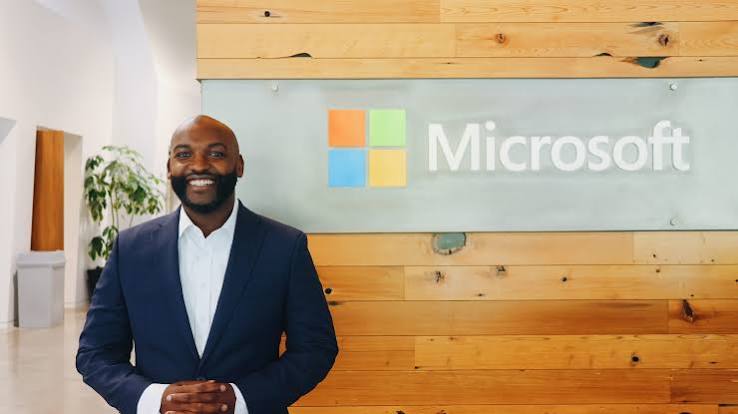
Microsoft Copilot training is available throughout Las Vegas and Southern Nevada, including the Las Vegas Strip, Downtown Las Vegas, Henderson, Summerlin, North Las Vegas, and surrounding communities.
Programs are available as onsite corporate training, keynote presentations, conference breakout sessions, executive briefings, and virtual workshops.
Featured Microsoft Copilot Training Program
Microsoft Copilot for Business Productivity & Collaboration
Available as a keynote, onsite corporate training program, or interactive workshop in Las Vegas, Nevada.
Microsoft Copilot is transforming how professionals work by bringing artificial intelligence into familiar workplace applications such as Outlook, Teams, Word, Excel, and PowerPoint.
However, many organizations are still determining how employees can use Copilot effectively, which capabilities are available, and how to encourage responsible AI adoption.
This interactive Microsoft Copilot training program helps participants understand the technology and identify practical opportunities to improve their everyday responsibilities.
Chris demonstrates how employees can use Copilot to write professional communications, summarize meetings, analyze information, prepare reports, create presentations, and manage projects.
The training can be customized for beginners, intermediate users, or more experienced professionals who want to explore advanced AI capabilities.
Participants leave with practical examples, improved prompting techniques, and ideas they can begin applying immediately.
What Participants Will Learn
1. Introduction to Microsoft Copilot and Copilot Chat
- Understand what Microsoft Copilot is and how it works.
- Explore the differences between Copilot Chat and Microsoft 365 Copilot.
- Learn how AI can improve workplace productivity.
- Identify which Copilot capabilities are available through different Microsoft 365 licenses.
- Explore practical AI applications for different departments and responsibilities.
2. Fundamentals of AI and Effective Prompting
- Understand how generative AI supports everyday business activities.
- Learn how to write prompts that produce more useful and relevant responses.
- Use objectives, context, sources, audience, formatting, and constraints to guide Copilot.
- Practice prompting techniques for research, writing, planning, and analysis.
- Improve responses through follow-up instructions and refinements.
3. Using Microsoft Copilot Across Microsoft 365 Applications
Participants explore practical applications of Copilot in familiar workplace tools, based on the capabilities available through their organization’s Microsoft 365 licenses.
Microsoft Outlook
- Draft professional emails and responses.
- Summarize lengthy email conversations.
- Prepare follow-up communications.
- Improve the clarity and tone of messages.
- Organize information for upcoming meetings.
Microsoft Teams
- Summarize meetings and conversations.
- Identify important decisions and action items.
- Prepare meeting agendas and follow-ups.
- Improve internal communication and collaboration.
- Catch up on relevant meeting information.
Microsoft Word
- Draft reports, proposals, and business documents.
- Summarize lengthy documents.
- Rewrite content for different audiences.
- Develop policies, procedures, and training materials.
- Organize complex ideas into structured documents.
Microsoft Excel
- Explore and analyze spreadsheet data.
- Identify patterns and trends.
- Generate and explain formulas.
- Summarize financial and operational information.
- Develop insights from business reports.
Microsoft PowerPoint
- Create presentation outlines and slide content.
- Develop presentations from existing information.
- Summarize key points for executive presentations.
- Improve the organization and clarity of slides.
- Prepare materials for meetings, conferences, and sales presentations.
4. Microsoft Copilot Chat for Everyday Productivity
- Research topics and summarize information.
- Brainstorm ideas and solve workplace challenges.
- Create reports, business content, and planning materials.
- Turn lengthy information into actionable recommendations.
- Develop reusable prompts for recurring responsibilities.
- Explore how AI can help employees manage their workloads more efficiently.
5. Microsoft Copilot Agents and Advanced AI Capabilities
For organizations ready to explore more advanced AI applications, the workshop can introduce Microsoft Copilot agents and AI-assisted workflows.
Participants can explore:
- What AI agents are and how they differ from traditional chatbots.
- How agents can support recurring business activities.
- Opportunities to create custom agents for teams and departments.
- Using approved organizational information in AI workflows.
- Identifying opportunities for automation and improved productivity.
- Understanding where human review and approval remain necessary.
Advanced demonstrations depend on the organization’s Microsoft licensing, permissions, and available tools.
6. Practical Microsoft Copilot Applications for Las Vegas Organizations
Las Vegas has a diverse business environment that includes major hospitality companies, convention and event organizations, entertainment businesses, healthcare providers, educational institutions, financial services, real estate, and professional services.
Chris customizes his Microsoft Copilot training to reflect the needs of employees working in these industries.
Hospitality and Tourism
- Draft guest communications and service responses.
- Analyze customer feedback and reviews.
- Develop employee training materials.
- Summarize operational information.
- Prepare management reports and internal communications.
Conventions and Event Management
- Create event proposals and planning documents.
- Develop conference agendas and promotional materials.
- Summarize attendee feedback and survey results.
- Prepare post-event reports.
- Improve communication between event teams.
Entertainment and Gaming Operations
- Develop internal communications and employee training resources.
- Analyze approved operational reports.
- Prepare presentations and departmental updates.
- Organize administrative information.
- Support planning and documentation while following applicable security and compliance requirements.
Sales and Marketing Teams
- Research potential customers and business opportunities.
- Draft sales proposals and follow-up communications.
- Develop marketing campaign ideas.
- Prepare client presentations.
- Summarize customer meetings and sales information.
Leadership and Management
- Analyze business information.
- Prepare executive summaries.
- Organize project updates.
- Evaluate strategic opportunities.
- Improve planning and internal decision-making.
Human Resources and Administration
- Create onboarding materials.
- Draft employee communications.
- Develop training documents.
- Organize administrative procedures.
- Support recurring reporting and documentation.
Healthcare, Education, and Nonprofits
- Summarize approved, non-sensitive information.
- Develop educational and training resources.
- Improve internal communications.
- Support research and administrative tasks.
- Organize planning documents and reports.
7. Responsible and Secure AI Usage
- Understand how Microsoft Copilot handles organizational information.
- Learn why permissions and access controls matter.
- Identify appropriate and inappropriate uses of AI.
- Protect confidential and sensitive information.
- Recognize AI-generated errors and inaccuracies.
- Verify important information before making decisions.
- Follow organizational AI policies and compliance requirements.
- Maintain appropriate human oversight.
Why Choose Chris as Your Microsoft Copilot Speaker or Trainer in Las Vegas?
Chris N. Cheetham-West, MBA, is an international AI expert, technology keynote speaker, author, and founder of LR Training Solutions.
Previously, Chris worked at Google, where he helped organizations understand and adopt emerging technologies. His experience in technology, business, and professional education allows him to explain complex AI capabilities in a practical and engaging way.
He has delivered presentations in 48 U.S. states and internationally, working with corporate teams, government agencies, universities, and professional organizations.
Chris is also the author of Digital Marketing for Results and Leading in a Virtual World.
His Microsoft Copilot training focuses on more than simply explaining software features. Participants learn how to apply Copilot to their actual responsibilities, develop effective prompts, and identify opportunities to improve productivity.
Training can be customized for employees, managers, executives, and conference attendees with different levels of AI experience.
Microsoft Copilot Training for Las Vegas Conferences and Corporate Events
Las Vegas is one of the country’s leading destinations for corporate meetings, national conventions, trade shows, leadership retreats, sales conferences, and professional development events.
Many organizations travel to Las Vegas to bring employees, executives, franchisees, and industry professionals together for training and strategic planning.
Chris provides Microsoft Copilot keynote presentations, interactive breakout sessions, and hands-on workshops for organizations hosting events throughout Las Vegas.
Programs can be scheduled in connection with events at venues such as:
- Las Vegas Convention Center
- Venetian Expo
- Mandalay Bay Convention Center
- Caesars Forum
- Wynn Las Vegas meeting and convention facilities
- MGM Grand Conference Center
- Resorts World Las Vegas
- Other Las Vegas conference hotels and corporate meeting facilities
Popular Events for Microsoft Copilot Training
Corporate Retreats and Leadership Offsites
Help managers and executives understand how Copilot can improve productivity, support decision-making, and help teams manage their responsibilities.
AI and Technology Conferences
Introduce attendees to Microsoft Copilot, generative AI, emerging capabilities, and practical workplace applications.
Company Sales Kickoffs
Demonstrate how sales teams can use Copilot for account research, proposals, presentations, client meetings, and follow-up communications.
National Conventions and Trade Shows
Deliver keynote presentations or breakout sessions that help attendees understand the business applications of Microsoft Copilot.
Association Conferences and Annual Meetings
Provide industry-specific training for association members, administrators, executives, and other professionals.
Employee Training and Professional Development
Help employees develop practical AI skills through demonstrations, guided exercises, and workplace examples.
Hospitality and Entertainment Industry Conferences
Explore ways Microsoft Copilot can help organizations improve internal communication, employee training, administrative productivity, and customer experience.
Whether your company is headquartered in Nevada or traveling to Las Vegas for a national event, Chris can customize a Microsoft Copilot presentation to match your audience and objectives.
Popular Microsoft Copilot Speaking and Training Topics
Microsoft Copilot for Workplace Productivity
Discover practical ways to use Microsoft Copilot to save time, improve communication, analyze information, and complete everyday tasks more efficiently.
Microsoft Copilot for Leadership and Decision-Making
Learn how executives, managers, and department leaders can use Copilot to prepare reports, summarize information, organize priorities, and support more informed decisions.
Microsoft Copilot for Sales and Marketing Teams
Explore how sales and marketing professionals can use Copilot to research customers, develop presentations, draft communications, and prepare proposals.
Microsoft Copilot Prompting for Better Results
Learn how to communicate effectively with Copilot by writing stronger prompts, providing useful context, refining responses, and creating reusable instructions.
Microsoft Copilot Agents and the Future of Work
Explore how Copilot agents and AI-assisted workflows can help organizations manage tasks, share information, and support employees.
Responsible AI Adoption with Microsoft Copilot
Understand the opportunities, risks, privacy considerations, and organizational policies involved in adopting Microsoft Copilot.
Microsoft Copilot Training Formats Available in Las Vegas
Chris offers flexible training programs for organizations hosting events or employee development sessions in Las Vegas.
60 to 90-Minute Keynote Presentations
An engaging introduction to Microsoft Copilot, practical AI applications, and emerging workplace trends. Ideal for conferences, general sessions, and leadership events.
Two-Hour Interactive Training Sessions
A combination of demonstrations, prompting exercises, and practical applications for employees and professional audiences.
Half-Day Microsoft Copilot Workshops
In-depth training covering Copilot Chat, Microsoft 365 applications, prompting techniques, and role-specific use cases.
Full-Day Corporate Training
Comprehensive training that allows participants to practice Microsoft Copilot across different workplace scenarios.
Multi-Session Employee Training Programs
Structured learning programs designed to help employees develop their Copilot skills over time.
Executive Briefings and Leadership Workshops
Customized programs focused on AI adoption, organizational opportunities, productivity, governance, and the future of work.
Programs can be delivered onsite throughout Las Vegas and Southern Nevada or virtually for organizations with employees in multiple locations.
Frequently Asked Questions About Microsoft Copilot Training in Las Vegas
Do you offer onsite Microsoft Copilot training in Las Vegas, Nevada?
Yes. Chris offers onsite Microsoft Copilot training throughout Las Vegas and surrounding Southern Nevada communities, including Henderson, Summerlin, North Las Vegas, and nearby areas.
Can Microsoft Copilot training be customized for our organization?
Yes. Training can be customized based on your organization’s industry, employee responsibilities, technology experience, Microsoft 365 licensing, and business objectives.
Is Microsoft Copilot training appropriate for beginners?
Yes. Sessions can begin with fundamental AI concepts and introduce participants to Copilot Chat, prompting, and everyday productivity applications. More advanced content can be added for experienced users.
Can you provide training specifically for Copilot in Excel, Outlook, Teams, Word, and PowerPoint?
Yes. Chris can develop sessions focused on the Microsoft 365 applications your employees use most frequently. Training exercises can be customized around real workplace activities and the capabilities available to your organization.
Can the workshop include Microsoft Copilot agents?
Yes. Training can introduce Copilot agents, demonstrate relevant use cases, and explain how organizations can evaluate opportunities for AI-assisted workflows.
Do employees need Microsoft 365 Copilot licenses to participate?
Not necessarily. Introductory sessions can cover Copilot Chat and general AI prompting. However, hands-on exercises involving certain Microsoft 365 Copilot features may require additional licensing and organizational permissions.
Can you deliver Microsoft Copilot training at our Las Vegas convention or corporate retreat?
Yes. Chris can deliver Microsoft Copilot presentations as part of corporate retreats, association conferences, national conventions, leadership meetings, sales kickoffs, and other professional events.
Can you provide Microsoft Copilot training for sales teams attending a Las Vegas conference?
Yes. Training can focus on practical applications for sales professionals, including account research, proposal development, presentations, meeting preparation, and customer follow-up communications.
How much does Microsoft Copilot corporate training in Las Vegas cost?
Training fees depend on the session duration, number of participants, customization requirements, and event logistics. Organizations can contact Chris to discuss options, pricing, and availability.
Book a Microsoft Copilot Speaker or Trainer in Las Vegas, Nevada
Help your employees move beyond learning about artificial intelligence and begin using Microsoft Copilot to improve everyday work.
Chris N. Cheetham-West offers customized Microsoft Copilot training, interactive corporate workshops, and keynote presentations for businesses, associations, government agencies, universities, and professional organizations throughout Las Vegas and Southern Nevada.
Whether you are planning a corporate retreat, national convention, employee development program, sales kickoff, or executive leadership meeting, Chris can help your audience discover practical ways to use Microsoft Copilot for productivity, collaboration, and organizational growth.
Contact Chris to Discuss Microsoft Copilot Training in Las Vegas
Recommended SEO Metadata
SEO Title: Microsoft Copilot Training Las Vegas, NV | Copilot Speaker
Meta Description: Book Chris Cheetham-West for Microsoft Copilot training in Las Vegas, Nevada. Corporate workshops, conference presentations, and hands-on employee training.
Recommended URL Slug: microsoft-copilot-training-las-vegas-nevada-copilot-speaker
Primary Keyword: Microsoft Copilot Training Las Vegas
Secondary Keywords:
- Microsoft Copilot Speaker Las Vegas
- Microsoft Copilot Trainer Las Vegas NV
- Microsoft Copilot Corporate Training Las Vegas
- Microsoft Copilot Workshop Las Vegas
- Microsoft 365 Copilot Training Las Vegas
- Microsoft Copilot Keynote Speaker Las Vegas
- AI Corporate Training Las Vegas
- Copilot Training Nevada
- Microsoft Copilot Conference Speaker Las Vegas
Suggested H1: Microsoft Copilot Training Las Vegas, Nevada | Copilot Speaker & Corporate Trainer
Suggested Image Alt Text: Chris Cheetham-West providing Microsoft Copilot corporate training and keynote presentations for Las Vegas conference audiences.
Recommended Internal Links:
- Contact Chris Cheetham-West
- Claude AI Training Las Vegas page
- Technology Keynote Speaker Las Vegas page, if published
- AI Keynote Speaker Las Vegas page, if published
